SyncManager2017.3.12j
Publisher Description
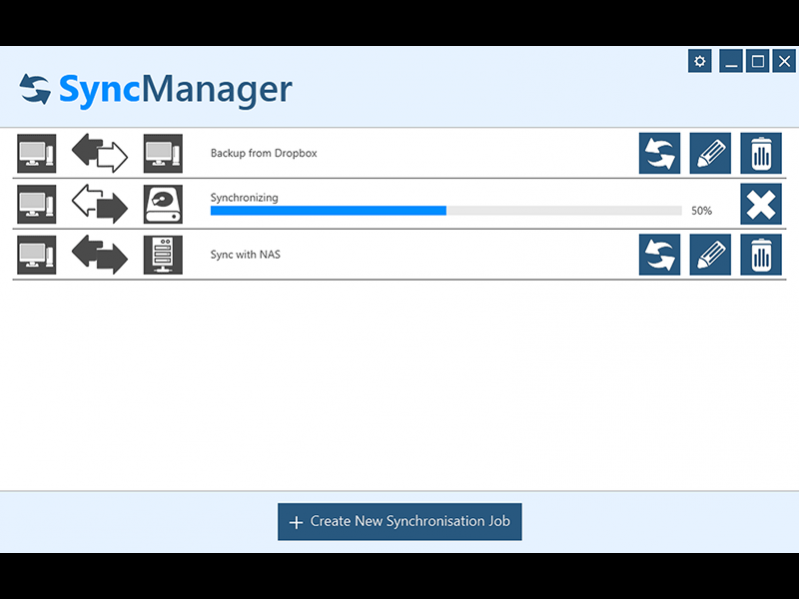
Keep your data in sync. Not only practical, but also time-saving: The SyncManager synchronizes data in the background between any folder, different hard drives or other established devices. You can, for example, automatically copy your latest camera images to the desired archive, or perform an automatic weekly backup of your sensitive data to a connected external hard drive. No matter what you choose, the SyncManager takes care of the job. Reliable and comfortable.
Set up once - never worry again. Setting up a synchronization job for any device, like a camera, is really easy. And once done you dont have to worry about it again. Every time a corresponding device is plugged into your PC, Syncmanager works on the related job and synchronizes your data in the background without bothering you. It's that simple!
Need more control? How often do you want to synchronize your data? You can choose between four different options: continuous, manual, daily or weekly. Your synchronization jobs are presented to you in a clear and easy way and can be changed and adjusted with only a few clicks, so you have everything under control. Always.
About SyncManager
This Automation Tools program is available in English, German, Czech, French. It was last updated on 29 September, 2026. SyncManager is compatible with the following operating systems: Windows.
The company that develops SyncManager is Abelssoft. The latest version released by its developer is 2017.3.12j. This version was rated by 1 users of our site and has an average rating of 0.5.
The download we have available for SyncManager has a file size of 2.9 MB. Just click the green Download button above to start the downloading process. The program is listed on our website since 2018-05-07 and was downloaded 742 times. We have already checked if the download link is safe, however for your own protection we recommend that you scan the downloaded software with your antivirus. Your antivirus may detect the SyncManager as malware if the download link is broken.
How to install SyncManager on your Windows device:
- Click on the Download button on our website. This will start the download from the website of the developer.
- Once the SyncManager is downloaded click on it to start the setup process (assuming you are on a desktop computer).
- When the installation is finished you should be able to see and run the program.
Program Details
System requirements
Download information
Pricing
Version History
version 2017.3.12j
posted on 2018-05-07
Besides a much faster synchronization the handling was optimized from scratch. The new feature "SyncHistory" produces a detailed protocol of all synchronization processes, which can be recalled with just one click.
